

Storage Rental
Storages (personal and clan) are specific to each location (not linked to each other).
Personal Storage:
- You can rent 5 personal storage cells at a time.
- Maximum size of personal storage: 50 cells for 500kg (exception – Foothills).
- Storage has an auto-sort and item grouping function (like in inventory).
Clan Storage:
- Rented at maximum volume immediately.
- Consists of three tabs.
- Each tab consists of 100 cells for 1,000 kg. (In total, one storage will have 300 cells for 3 tons).
| Storage Location | Cost of renting personal storage (number of cells) | Cost of renting clan storage |
|---|---|---|
| Solnechny town | 50 (for 10) + 50 (for 1) 500 kg, 50 cells | 10,000 |
| Black Sunset camp | 50 (for 10) + 50 (for 1) 500 kg, 50 cells | 10,000 |
| Minaev’s mine | 1,000 500 kg, 50 cells | 10,000 |
| Korovye village | 1,000, 250 500 kg, 50 cells | 10,000 |
| Western Mine (Senya Porokh) | 2,000 500 kg, 50 cells | 20,000 |
| Tunnels | 1,500 500 kg, 50 cells | 25,000 |
| Exclusion Zone (Tikhon) | 500 kg, 50 cells | – |
| Canyon (both bases) | 2,000 (20) 500 kg, 50 cells | 10,000 |
| Test Range (both bases) | 2,000 (20) 500 kg, 50 cells | |
| Coast | 15,000 500 kg, 50 cells | 200,000 |
| Foothills (both bases) | 200,000 (20) + 5,000 (for 1) 750 kg, 75 cells | 2,000,000 |
Clan Storages
Only the clan head and deputies can rent a clan storage.
Configuring Storage Access
After creating a clan, all its members have full access to the storage because policy groups have not been created yet. If you plan to recruit new players, it is important to configure the access system immediately:
1. Create policy groups.
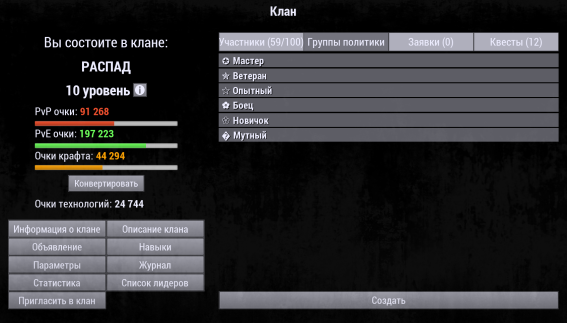
Their number is unlimited, but they cannot be deleted after creation. It is optimal to create 3–5 groups, depending on the clan structure.
2. Assign policy groups to all clan members.
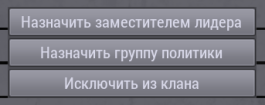
3. Configure access rights for storage tabs:
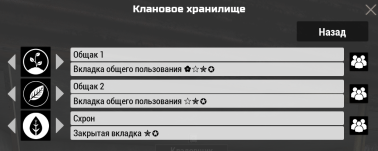
- “Deposit” – the player can see the tab contents and add resources.
- “Withdraw” – the player can take resources.
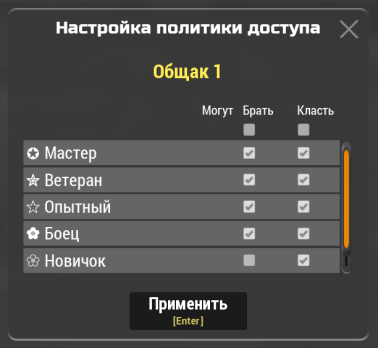
If no parameter is selected, the player does not see the tab and cannot interact with it.
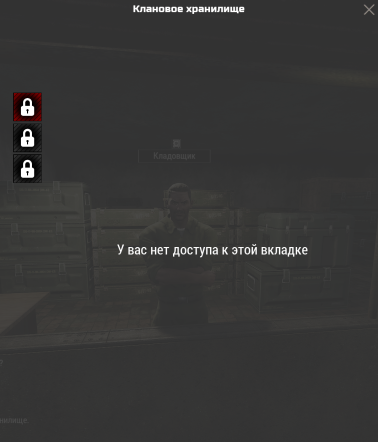
4. Save changes.
Additional Storage Functions
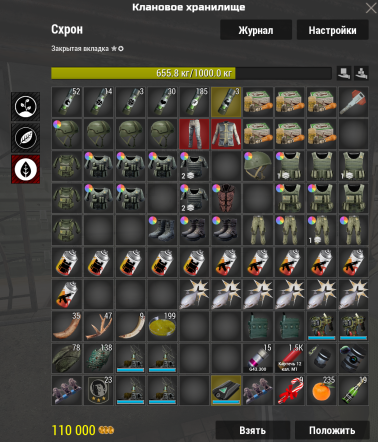
- If the clan has no policy groups (or the player hasn’t been assigned any policy group yet), ordinary soldiers have access to all storage tabs.
- The clan head and deputies have full access to all tabs of clan storages.
- Clan storage tabs can be used not only for storing resources but also for transferring tokens.
- The clan head and deputies can view the clan storage log, which records all movements of items and tokens (time, who took and put the item, comment). Data is stored for 1 month.
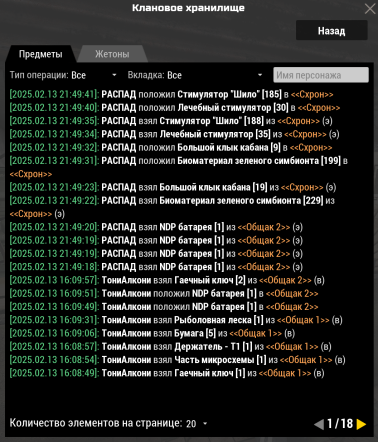
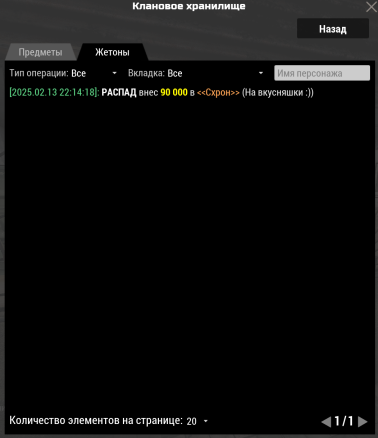
- Only the clan head and deputies can sort, move, and group items inside the storage.
- When withdrawing items or tokens, players are required to leave a comment. This function cannot be disabled. If the clan doesn’t require meaningful records, you can simply leave any character to save time.
Safety Tips
- Do not give the deputy role to players, even for a couple of minutes (e.g., if a player asks for the role to buy something).
- Distribute storage access rights wisely.
- Do not give access to unfamiliar players to avoid theft and conflicts.