In Will To Live Online, it is possible to modify weapons and armor. Such modification can significantly boost some parameters, but typically at the expense of others. Below is a detailed breakdown of what is required and how the modification principle works.
Weapons
The process of creating a truly good weapon in the game is complex, so its cost is quite high. First, you need to craft a “blank” on a CNC machine, and then apply modification kits to it. In case of success, you will get a high-quality weapon, but the entire process requires attention.
To produce a “blank”, a V4 module is required, which can be looted from robots at the Drone Arena or bought from other players. Modules V1, V2, and V3 are not suitable for crafting a good “blank” – they are used for other purposes, such as quests, creating drones, and weapons for selling to the trader or disassembling for parts.
Although the V4 module is rare, having it does not guarantee success in creating a good “blank”. It is important that the parameters of the resulting “blank” meet the standards (indicated in the table below). If they differ significantly, it is better to sell the gun to the trader, as further improvement will be pointless.
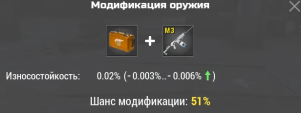
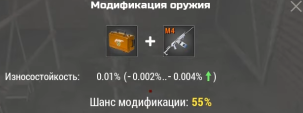
Once the “blank” is created, you can start improving it using modification kits. To create them, you will need blueprints that drop from loot and upon completion of events, as well as parts that can only be obtained by disassembling weapons. Note that the chance of successfully applying a modification kit is low, and in case of failure, the weapon will be broken. For repair, a “Master Repair Kit” (sold for donation) is required, so it is worth buying several repair kits and creating several modification kits in advance.
The sequence of applying kits depends on what the weapon is intended for – PvP or PvE. Usually, 2 durability mods are applied first, and then damage. For PvP, the main focus is on accuracy (so the bullet flies exactly to the target) and damage (so it is maximum). For PvE, damage and durability (so the weapon does not break during long mob farming) are important.
However, these recommendations are general in nature, and much depends on the specific gun and playstyle.
●PDA Module with a recipe for creating weapon blanks can be looted from robots at the Drone Arena.
●PDA Module with a recipe for creating modification kits can be found in loot crates.
●Modification parts can be obtained by disassembling weapons (the higher the weapon level \ more modifications on it – the higher the chance of getting a larger number of parts).
●Blueprints drop from loot and upon completion of events.
●Modules V1, V2, V3, V4 drop from robots at the Drone Arena.
V1 – 10% (10 blanks)
V2 – 20% (5 blanks)
V3 – 25% (4 blanks)
V4 – 50% (2 blanks)
●Master Repair Kit is sold in the in-game donation shop, it can also be bought from other players or looted for completing Adventure #1
●Damage Box = 3 modifications
●Accuracy Box = 3 modifications
●Durability Box = 1 modification
●For PvP: maximum accuracy and good damage. Durability is not as important.
●For PvE: maximum damage and good durability. Accuracy is secondary.
●When choosing a weapon, it is important to focus not on the damage bonus in percent, but on its maximum damage. Minimum damage usually does not play a big role: if you have fully upgraded the corresponding branch, you will almost always deal hits close to the maximum. But if you use an off-profile weapon and the branch is not fully upgraded – then you should pay attention to the minimum damage.
.
Blueprints
Parts
Modification Kits
Modification Effects
Accuracy
Damage
Durability
Accuracy
Damage
Durability
Accuracy
Damage
Durability
Accuracy
Damage
Durability
Pistols
Damage:-4%…-7%
Accuracy: +20%…+40%
Durability: -25%…-50%
Damage:+10%…+12%
Accuracy: -20%…-40%
Durability: -25%...-50%
Durability: +20%…+40%
Assault Rifles
Sniper Rifles
Shotguns
SMGs
Weapon Crafting and Upgrading
The table below shows a dry calculation of what a weapon might look like after modification. The damage range is indicated – from minimum to maximum, depending on the success of the result. Conditionally, a good gun is considered starting from the middle of the range and above. Anything below the middle can safely be considered outright trash.
Name
Base Weapon Damage
Addition from 1 Damage Box
Weapon stats after successfully applying 1 Damage Modification Box
Addition when crafting weapon with V4 Module
Weapon stats when crafted with V4 Module
Weapon stats from V4 Module + 1 Damage Modification Box
Number of modifications
.
.
M2
.
M3
M6
% addition
.
+10%…+12%
+10%…+12%
+17%…+22%
+17%…+22%
+28.6%…+36.7%
L96A1
800 – 1200
80…96 – 120…144
880…896 – 1320…1344
136…176 – 204…264
936…976 – 1404…1464
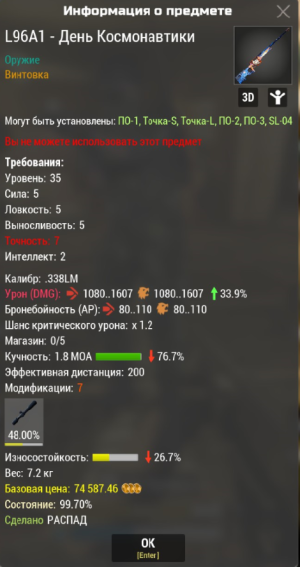
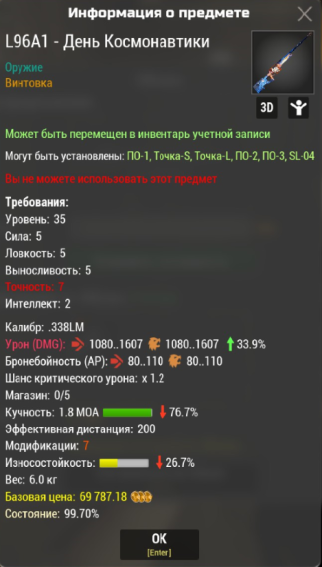
1030…1093 – 1544…1641
MSR-10
300 – 500
30…36 – 50…60
330…336 – 550…560
51…66 – 85…110
351…366 – 585…610
836…410 – 644…683
Vepr-12
350 – 550
35…42 – 55…66
385…392 – 605…616
60…77 – 94…121
410…427 – 644…671
451…478 – 708…752
WSC PDW
210 – 340
21…25 – 34…41
231…235 – 374…381
36…46 – 58…75
246…256 – 398…415
271…287 – 438…465
MSR-12
423 – 630
42…51 – 63…76
465…474 – 693…706
66…88 – 102…132
489…511 – 732…762
538…572 – 805…853
Table showing parameters (damage) with the best blanks for subsequent weapon modification (according to player recommendations):
Name
%
M3
M6
M9
L96A1
35.4%
976-1451
1093-1625
1052-1578
MSR-10
35.2%
366-604
410-676
393-656
Vepr-12
35.5%
427-665
478-745
459-721
WSC PDW
35.3%
257-411
288-460
276-446
MSR-12
35.3%
488-725
*524-774
547-812
524-787
How to get a maximum damage bonus of 22% while maintaining a total bonus of 20.9% so that a damage modification kit can be used:
Base MSR-10
300-500
M3 17%-17% (17%)
351-585
M3 22%-22% (22%)
366-610
M3 19.8%-22% (20.9%)
359.4-610
M3 20.9%-20.9% (20.9%)
362.7-604.5
M3 22%-19.8% (20.9%)
366-599
*MSR-10. Best blank – 20.6%
Upgrading M2 Weapons
For modifying “transitional” weapons, it is recommended to use weapons from in-game slot machines or looted from bosses, as they already have the M2 modification. At the same time, the sequence of applying modification kits differs from that used for “blanks” of top-tier weapons.
As a rule, 3 durability mods and 1 damage mod are applied to weapons from slot machines.
Name
Base Parameters
After Modification
%
Damage
%
Damage
Zastava M-70 M2
Damage: +17.1%
Wear: -100%
230-400
31.1%
246-459
M16 M2
Damage: +20.6%
Wear: -83.3%
250-390
35.0%
280-459
Pioneer M2
Damage: +20%
Wear: -40%
420-720
34.3%
470-806
Grom M2
Damage: +16.7%
Wear: -33.3%
750-1050
30.7%
840-1176
Marauder-12 M2
Damage: +14.3%
Wear: -100%
225-400
28%
252-448
SPAS-12 M2
Damage: +20.0%
Wear: -100%
350-600
34.4%
403-672
S&W.500 Special
Damage: +20.0%
Wear: -100%
720-1080 \ 760-1140
34.4%
806-1210
How percentages are calculated when applying modification kits
Below is the principle of calculating characteristics so that you do not have questions when using modification kits. This will help you understand why the final values are the way they are and what to expect during subsequent weapon upgrades.
How Wear percentages work when modifying weapons
Many players have encountered a situation where the final weapon wear after modification goes beyond the limits specified in the modifier description. Let’s figure out why this happens.
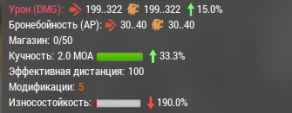
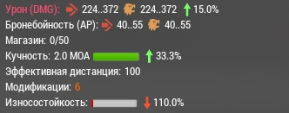
Example: Base weapon wear: -100% (we take SMG-90 M2 Lucky). The first accuracy modification should add wear in the range of -25% to -50%, but in fact, the final wear was -190% (that is, the modification gave -90%, which goes beyond the declared limits). The second durability modification should restore +20% to +40%, but in fact, the wear changed to -110% — the increase was +80%, again not corresponding to the description.
Second example: Take a weapon with wear: -60%. Apply two durability modification kits to it in a row (each should give +20%…+40%). After the first kit, the wear became 0, after the second: +30%. Although each modification should have given an increase of no more than +40%, in total the result was +90% — again going beyond the supposed range.
Administration answers:
“The problems with perceiving percentages are related to the fact that there are calculations from the “base” and “from the current” wear value, so everything is fine here. When we introduced this, we even wrote in the patch notes that there would be misunderstanding.”
“The mechanics are very complex. In fact, items do not have such a concept as “durability” or “health” or “wear”. There is an absolute value, in numbers, which is the same for all items. When applying modifications, it is not this value that changes, but the value of how much the item “deteriorates” when used – its coefficient. And depending on this coefficient, “wear” is calculated. Unlike damage, its values and indicators are relative.”
“Let me explain with a simple example — for clarity, let’s take abstract values.
Imagine that all items have base “health” — 1000 units. With each use, 1 unit is subtracted, respectively, the item can be used 1000 times.
Now apply a -100% durability modifier. This does not mean that health is reset to zero. It remains 1000, but is consumed twice as fast — that is, now 2 units are spent per use. And the item will withstand only 500 uses. It is after this that the displayed durability value is recalculated.
If a +50% durability modifier is then applied, the situation changes again: now the wear returns to a value of 1 unit per use. Why? Because:
• at -100% wear became 2
• and +50% of this new (2) value = 1, that is, returns to the initial consumption
Because 100% of the value 1 is 1, and 50% of the value 2 is also 1, that’s how it turns out that first a -100% modification was done, and then a +50% modification returned to the previous value.
That’s how it turns out: first the wear was increased, then decreased, and in the end returned to the original value.
We understand that such logic can be confusing, so the most reliable way is to focus on the final numbers displayed in the item characteristics.”
Conclusion:
Wear percentages indicated in modifier descriptions are conditional. They do not reflect the exact change in the indicator, but only give a general idea of the modification’s effect. Due to the internal logic of the system, the player cannot accurately calculate the final wear after applying modifications on their own.
How Damage percentages work when modifying weapons
Sometimes players have a misconception that each subsequent modification changes damage based on the already improved value. However, this is not the case. All damage changes are calculated from the base (stock) value of the weapon, not the current one.
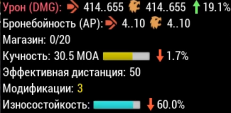
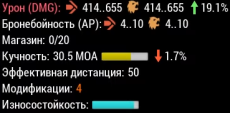
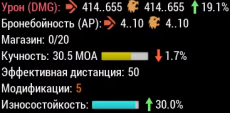
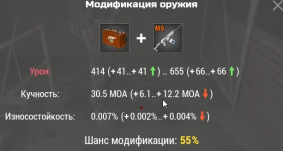
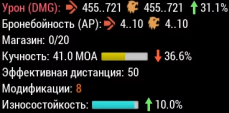
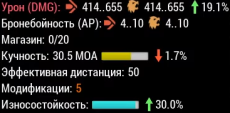
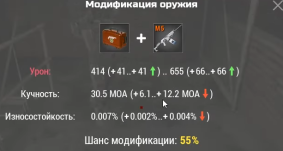
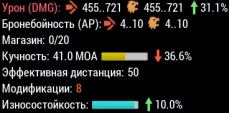
Example:Take the weapon “Vepr-12” (base damage, without modifications, = 350–550), which already has 5 modifications: damage bonus is +19.1% → damage: 414–655. Now apply a damage modification, which should give +10%…+12%. After application, the total bonus became +31.1% → damage: 455–721. Although the current damage was increased from 414–655 to 455–721, the new modification added its percentages from the original 350–550.
Conclusion:
Each damage modification is always calculated from the base weapon characteristics, not from the total value after previous modifications. This avoids a “snowball effect” from percentages and ensures balance.
How Accuracy percentages work when modifying weapons
Weapon accuracy percentages are calculated in the same way as damage: changes are applied from the base value. However, it is important to understand that accuracy percentages affect the bullet spread angle (MOA), and their calculation may not be as obvious as in the case of damage.
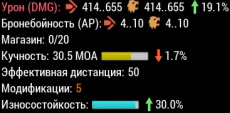
Example: Take the weapon “Vepr-12” (base accuracy =30.0 MOA), which already has 5 modifications, where accuracy is: -1.7% → 30.5 MOA. Now apply a damage modification, which should give accuracy -20%…-40%. After application, the total bonus became -36.6% → 41.0 MOA.
Conclusion:
Accuracy changes are always calculated from the base value and affect the bullet spread angle (MOA).
Weapon Personalization
When crafting and modifying a weapon, its description indicates who made it.
If the modification was performed by a neutral or faction player without a clan tag, their nickname is displayed. If the modification was performed by a player who is in a clan, their clan tag is displayed.
However, if you paint such a weapon with a donation paint and place it in the account inventory, the inscription about the creator will disappear irrevocably.
Clothing
The game allows modification of clothing (all armor, except armor plates). No more than two modification kits can be applied to one clothing item. The first kit increases characteristics to M2, two kits – to M4. Maximum modification effect: +20% to armor. Wear can change in both positive and negative directions.
●PDA Module with a recipe for creating modification kits can be obtained from loot drops.
●Modification parts can be obtained as a reward for participating in the Foothills War.
We use cookies to operate the website, for analytics, and to display relevant advertising. By continuing to use the site, you agree to the Privacy Policy.


 V1 – 10% (10 blanks)
 V2 – 20% (5 blanks)
 V3 – 25% (4 blanks)
 V4 – 50% (2 blanks)